SQL Backing up, Restore and script based

 Hey Guys, I hope that you are enjoying with my blogs writing and today's we will cover some  "SQL SERVER" Concepts.


Microsoft SQL Server is a relational database management system, or RDBMS, developed and marketed by Microsoft.
As a database server, it is a software products with primary function of storing and retrieving data as requested by other software application.
Initial Releases is April 24, 1989;


  • Backup: A copy of SQL server data that can be used to restore recover the data after failure.
  • A backup of SQL server that is created at the level of database or one or more of its file or filegroup.
  • Full Backup: The most basic and complete type of backup is a full backup. This type of backup makes a copy of all data to a storage device, such as disk or tape  
  • Incremental Backup: It is a type of backup that only copies data that has been changed or created since the previous backup activity was conducted. 
  • Differential Backup: A data backup that is based on the latest full backup of a complete or partial database.
  • Incremental backup, sometimes called Differential backup while Differential backup are sometimes called "Cumulative backup".


  • Transaction Log: It is an integral part of SQL. Every database has a transaction file that is stored within the log file that is separated from data file It records all database modification.
      Steps for backup:
  •  Connect to the server and expand database -> Right click on database
  • A new windows will be open then select which type of backup you want , so I have selected full backup .

  • Select backup destination with .bak extension
  •    And finally its backup has completed.
  •     And this is my back file in D drive


Data type in C# .NET

 20th Day

Hey Guys, I hope that you are Enjoying with my blogs and in previous blog we have  learned about Basic concepts of C#, Class  Libraries and Reusability and   Today's we will see Data type of C# .


  • .NET is a free, cross-platform, open source developer platform for building many different types of applications.
  • .NET Core is a cross-platform .NET implementation for websites, servers, and console apps on Windows, Linux, and macOS.
  Data Type 
Data type specifies the size and type of variable values .It is important to use the correct  datatypes of corresponding variable. C# is strongly typed language.

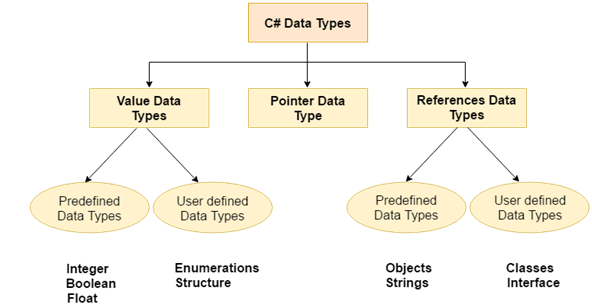
                                                  CSHRAP Data types 1
   
  • Numeric data types in C# must used for numbers are int( whole number) and double(floating point numbers)..
     int i = 10; // Now focus on integer and double.
     decimal y = 10.45;
     double z = 10.23;
     float t = 10;
     string x = "shiv123";
     bool b = true;
  • To find the the Min and Max values of int, double float etc.

  • To find Min and Max values of Int16(short) , Int32(int), Int64(long) etc.
  • Input:

    static void Main(string[] args)
            {
                // numerical 
                Console.WriteLine("Min & Max value of short(Int16) ");
                Console.Write(short.MinValue  );
                Console.Write(" to ");
                Console.WriteLine(short.MaxValue );
                Console.Write("\n");
                Console.WriteLine("Min & Max value of int(Int32) ");
                Console.Write(int.MinValue);
                Console.Write(" to ");
                Console.WriteLine(int.MaxValue);
                Console.Write("\n");
                Console.WriteLine("Min & Max value of long(Int64) ");
                Console.Write(long.MinValue);
                Console.Write(" to ");
                Console.WriteLine(long.MaxValue);

                Console.Write("\n");
                Console.WriteLine("Min & Max value of double");
                Console.Write(double.MinValue  );
                Console.Write(" to ");
                Console.WriteLine(double.MaxValue );
                Console.Read();
            }
  • int16 :  It is called short which values lies between -32768 to 32767 or 2 raise 16/2.Which can used it for age ,weight or small use it gives two types like Signed value it can hold +ve values as well as -ve. while in unsigned only +ve value can holds.
  • And signed and unsigned values for all data types like double, float etc.
  • int32 : It is simply called int which values lies between -2147483648 to 2147483647. Which can used greater value than int16.
  • int64 :It is called long which values lies between -9223372036854775808 to 9223372036854775807. Which can used for long values.

           Output: 


                                                   Must Watch this video for more details learn..
                                                             
                                                              
                                                                             Thank You...!
  

Class Libraries and Reusability in C#

 19th Day

Hey Guys, I hope that you are Enjoying with my blogs in previous block we studied basic of C#, Its Installation, IL code by just in  time make it machine code and Today's we will study about Basic concepts of C#, Class  Libraries and Reusability.

  • .NET is a free, cross-platform, open source developer platform for building many different types of applications.
  • .NET Core is a cross-platform .NET implementation for websites, servers, and console apps on Windows, Linux, and macOS.
  • With .NET, you can use multiple languages, editors, and libraries to build for web, mobile, desktop, games, and IoT.
  • So lets create one console app(.NET core)  project for better understanding to this concept.
  • It is an exe i.e executable. we can double click and execute this folder. 
  • Build now and right click on console app open as an explorer go to bin folder and will get exe folder. 
  • Input:(Program.cs)
using System;
using ClassLibrary1;
namespace ConsoleApp2
{
    class Program
    {
        static void Main(string[] args)
        {
           
            Class1 x = new Class1();// we can call here to class1
            Console.WriteLine(x.Add(10,20));
            // here we giving parameter to add function
            Console.WriteLine("Hello World!");
            Console.Read();
        }
    }
}


  • To make DLL, Will have to create a Class library.
  • DLL stands for dynamic link library it is library that contains function and codes that can used by more than one program at a time. Once we have created DLL we can use in many application. 
  • Input:(Class1.cs)
    using System;

    namespace ClassLibrary1
    {
        public class Class1
        {
            public int Add(int num1, int num2)
            {
                return num1 + num2; 
            }
        }
    }
  • This code we can execute but can't link it.
  • After build it, If we want to see DLL file go to its bin folder then executable file not will show , it show dll(dynamic link library) like given below
  • We can't run this folder by double click because its not an executable it is Dynamic link library.so we can call to its function from another class.
  • For reference to console app ,go to right side-> right click on dependency -> add project reference-> class library.
  • Assembly has two types of library 1. Exe  2. DLL.
  • Output:

                             Must refer this videos for more details:

                                         Thank You...!


Basic concepts of C# ,IL code and JIT

  18th Day

Hey Guys, I hope that you are Enjoying with my blogs and Today's we will study about .NET Platform with "C#" Language basic concept.

  • .NET is a free, cross-platform, open source developer platform for building many different types of applications.
  • .NET Core is a cross-platform .NET implementation for websites, servers, and console apps on Windows, Linux, and macOS.
  • With .NET, you can use multiple languages, editors, and libraries to build for web, mobile, desktop, games, and IoT.
  • whatever code write in C# ,It compiles in intermediate language code and by  just in time compiler(JIT) make IL code to machine code. For Example

  • suppose if want to see IL code then build this program.
  • If we build this code then its IL code will show in bin folder
  • Go to solution explorer -> right click->open folder in file Explorer->binary folder(bin)->debug->


  • Many code folders has like dynamic link library(dll) Console application only for start to dll not run directly that's why application console first link and then run dll.
  • when we double click on exe then JIT start in background.
  • And JIT compile to single-single line make it machine code
  • Intermediate language disassembler (ILDSM) for showing purpose we will to go on visual command prompt
  • Like visual studio developer command prompt go and open then new dialogue box will open  drag and drop click on console application
  • Expand -> static void main then IL code will be show
  • so we can say that C# doesn't compile directly into machine code its first  compile into intermediate language then this IL code later compile by JIT into Binary code.
  • For Example: Flow of C# code

  •  C# is a strongly typed language it means that language is one in which variables are bound to specific data types, and will result in type errors like.  
           int i = 0;
                i++;
                i="Raushan"
          It will show error can not implicitly convert type string to int.
  • A strongly-typed language in which variables are bound to specific data types, and will result in type errors if types do not match up as expected in the expression — regardless of when type checking occurs.

  • C# Data Types: It is strongly data type language.

  • if condition : It is used where condition is true. otherwise else condition.
                     Input:
                     Output:     After insert data
                                       Without insert data 


  • Convert one data type to another:
                                    Input:
                                 

                                   Output: 
                                   

                          Must refer this videos for more details:

                
                                      Thank You...!
       

NG MODULE , DIRECTIVES

 15th Day               

Hey Guys, I hope that you are enjoying with my blogs writing and  today's we will create a template project ,Electronic Medical Records (EMR).So let's some introduction                                                

Angular is a framework that is used to create web application. Angular uses typescript to write our business logic and method but browser does not understand typescript. The browser understand JavaScript . so that's why Angular CLI  come into picture. 


View: app.component.html has html code .In this folder we make user interface.

Model: .

Component: Bind the view and model is called component(app.component.ts). which communicate with anyone like CSS, Module etc.

Module: A group of components is termed as module(app.module.ts).

App.component.spec.ts : It is a testing file.

  1. In this project, First created model like app.model.ts.

app.model.ts(model)

//1. And this my model
export class Patient{
  name:string="";
  age:number=0;
 //2.One patient has list of problem so used an Array..
  problem:Array<Problem> = new Array<Problem>();
}
class Problem{
  //3.for patient it will be many problems...
  description:string="";
}

2.Then after created an user interface(app.component.html).
app.component.html(View)
<!--This is the  User interface
// To bind the text box like Name or Age use directive(ng model)-->
Patient Screen <br>
Name:- <input type="text" [(ngModel)]="patientobj.name" name=""id="txtname"><br>
Age:-  <input type="text" [(ngModel)]="patientobj.age" number=""id="txtage"><br>
<input type="button" (click)="add()" value="Add"/><br>
{{patientobj.name}}<br><!--It is an Expression or interpolation-->
<b>{{patientobj.age}} </b><br>// Here mixing html with angular directives for bold

<table>
  <tr>
    <td>Name</td>
    <td>Age</td>
  </tr>
  <tr *ngFor="let temp of patientobjs">
    <td>{{temp.name}}</td>
    <td>{{temp.age}}</td>
  </tr>
</table>

Explanation: 

  • It may be we go from view to model or model to view or both side-
  • for view to component use ()
  • for component to view use []
  • for two way binding use [()] like [(ngModel)] by using we bind text box with name.

  • input type="text" ngModel=" ngModel="patientobj.name it means that
  • input type(textbox) value bind with name
  • interpolation {{}}
3. After creating model and view .Component which connect to the view and
model ,It will be expose Via the component,  first import the model to component and 
component make object and will be expose to view.
  • view and model type has connection through template URL
app.component.ts(Component)

import { Component} from '@angular/core';
// Through below this line, model will be connect
import {Patient} from "./app.model"
// If code has in current folder then use "./app.model" otherwise "../app.model"
// there has three templates selector, templateurl, styleurl...
@Component({
// this decorator indicates that its an angular components..
// Otherwise it indicates simple code of TypeScript
  selector: 'app-root',
  templateUrl: './app.component.html',
  //its meant to specify the html
  styleUrls: ['./app.component.css']
  //its meant to specify the html
})
export class AppComponent {// This is whole senario is component
  // this Appcomponents color will come above mention, styleUrls: ['./app.component.css']
  patientobj:Patient=new Patient();
  // this patient object tideup with UI(textbox) but now i want a collection to add
  // for that make a list like
  patientobjs:Array<Patient>=new Array<Patient>();
  // this will tideup with table
  // This Array is a stack it means push and pop
  add()// through this method we add current patient
  {
     this.patientobjs.push(this.patientobj);// it will add to the current patient.
     this.patientobj=new Patient();//This will clear my screen
  }// To calling to this add method we write in button(click)="Add()"
}

app.module.ts: (It is the collection of Component)

import { NgModule } from '@angular/core';
import { FormsModule } from '@angular/forms';
import { BrowserModule } from '@angular/platform-browser';

import { AppComponent } from './app.component';

@NgModule({
  declarations: [
    AppComponent
  ],
  imports: [
    BrowserModule,FormsModule
  ],
  providers: [],
  bootstrap: [AppComponent]
})
export class AppModule { }

So finally have tried that, textbox data should be set in object and object's data through interpolation it should be show on UI.

Output:


                          Must watch this video for more details...


                                             Thank You...!


ASP.NET MVC Interview Questions Part 3

Hey Guys I hope that you are Enjoying with my Blogs Writing and in this blog we will cover Interview question of ASP.NET MVC Core. So Lets Start....
                              

     Q. What is dependency injection ?
  • Dependency injection is a practice of providing dependent object from outside rather than that the class creating using new keyword.  
  • .NET supports the dependency injection software design pattern, which is a techinque for achieving Inversion of Control between classes and their dependencies.     
    Q. How can we read configuration data from appsettings.json ?
  • To the config data from appsettings.json, We use the IConfiguration object which is Injected by MVC Core Dependency Injection Framework. 
    Q. What is the need of view Data ?
  • View data is a dictionary of objects that are stored and retrieve using strings as keys. It is used to transfer data from Controller to View.
  • Since View Data is a dictionary, it contains key-Value pairs where each key must be a string.
  • View Data only transfer data from controller to view , not vice-versa. It is valid only during the current page. 
    Q. What is the difference between viewdata and viewbag ? 

  • View Data and View Bag are used for the same purpose to transfer data from controller to view. 
  • View Data is nothing but a dictionary of objects and is accessible by strings as key.
  • View Data is the property of Controller that expose an instance of the ViewData Dictionary class.
  • ViewBag is very similar to View data.
  • View Bag is a dynamic property( Dynamic keyword which is introduced in .NET framework 4.0).
  • ViewBag is able to set and get value dynamically .


                                                              Thank You...!


ASP.NET MVC Interview Questions Part 2

 Hey Guys I hope that you are Enjoying with my Blogs Writing and in this blog we will cover Interview question of ASP.NET MVC Core. So Lets Start....


  1. How is the URL structure of MVC Core ?
  2. If the viewname is different from action name how to invoke it?
  3. Defining navigations using anchor tag?
  4. How to pass model to the view ?
  5. What is a strongly typed views  and how do we create them?
  6. How can we change the startup controller name and actin name ?
  7. What is routing ?
  8. How can we pass value in the routes ?
  9. How can we validate the values of the routes ?