pause >nul
Crack
@echo off
title Activate Microsoft Office 2016 (ALL versions) for FREE - MSGuides.com&cls&echo =====================================================================================&echo #Project: Activating Microsoft software products for FREE without additional software&echo =====================================================================================&echo.&echo #Supported products:&echo - Microsoft Office Standard 2016&echo - Microsoft Office Professional Plus 2016&echo.&echo.&(if exist "%ProgramFiles%\Microsoft Office\Office16\ospp.vbs" cd /d "%ProgramFiles%\Microsoft Office\Office16")&(if exist "%ProgramFiles(x86)%\Microsoft Office\Office16\ospp.vbs" cd /d "%ProgramFiles(x86)%\Microsoft Office\Office16")&(for /f %%x in ('dir /b ..\root\Licenses16\proplusvl_kms*.xrm-ms') do cscript ospp.vbs /inslic:"..\root\Licenses16\%%x" >nul)&(for /f %%x in ('dir /b ..\root\Licenses16\proplusvl_mak*.xrm-ms') do cscript ospp.vbs /inslic:"..\root\Licenses16\%%x" >nul)&echo.&echo ============================================================================&echo Activating your Office...&cscript //nologo ospp.vbs /setprt:1688 >nul&cscript //nologo ospp.vbs /unpkey:WFG99 >nul&cscript //nologo ospp.vbs /unpkey:DRTFM >nul&cscript //nologo ospp.vbs /unpkey:BTDRB >nul&cscript //nologo ospp.vbs /unpkey:CPQVG >nul&set i=1&cscript //nologo ospp.vbs /inpkey:XQNVK-8JYDB-WJ9W3-YJ8YR-WFG99 >nul||goto notsupported
:skms
if %i% GTR 10 goto busy
if %i% EQU 1 set KMS=kms7.MSGuides.com
if %i% EQU 2 set KMS=s8.uk.to
if %i% EQU 3 set KMS=s9.us.to
if %i% GTR 3 goto ato
cscript //nologo ospp.vbs /sethst:%KMS% >nul
:ato
echo ============================================================================&echo.&echo.&cscript //nologo ospp.vbs /act | find /i "successful" && (echo.&echo ============================================================================&echo.&echo #My official blog: MSGuides.com&echo.&echo #How it works: bit.ly/kms-server&echo.&echo #Please feel free to contact me at msguides.com@gmail.com if you have any questions or concerns.&echo.&echo #Please consider supporting this project: donate.msguides.com&echo #Your support is helping me keep my servers running 24/7!&echo.&echo ============================================================================&choice /n /c YN /m "Would you like to visit my blog [Y,N]?" & if errorlevel 2 exit) || (echo The connection to my KMS server failed! Trying to connect to another one... & echo Please wait... & echo. & echo. & set /a i+=1 & goto skms)
explorer "http://MSGuides.com"&goto halt
:notsupported
echo ============================================================================&echo.&echo Sorry, your version is not supported.&echo.&goto halt
:busy
echo ============================================================================&echo.&echo Sorry, the server is busy and can't respond to your request. Please try again.&echo.
:halt


STACK AND HEAP

Primitive Data Type : Number, float, Boolean etc. are called Primitive Data Type Most probably , Primitive Data Types created on stack.
STACK AND HEAP
When .NET application runs then all variables allocate in RAM / temp memory and its operating system/programming language divide it into two types of memory one is Stack and another one Heap
OR
Stack is used for Static Memory allocation and Heap for Dynamic memory allocation and both are stored in the RAM.
STACK
- Stack always reserved in the Last in first out i.e. LIFO.
- Variable allocated on the stack are stored directly to the memory and access to this memory is very fast.
- We can use the Stack if we know exactly how much data have required to allocate before compile time. While in Heap we don't know exactly.
- Insert the data item at the top of Stack is called PUSH.
- Delete the data item at the top of Stack is called POP.
HEAP
- Heap is a area of memory where chunk are allocated to store to certain kind of data object.
- Variable allocated on the Heap have their memory allocated at run time and accessing this memory bit slower.
static void Main(string[] args)
{
//line1
int i= 10;
//line2
int y = i;
// line3
Customer x = new Customer();
x.name = "Raushan";
// line 4
Customer z = x;
z.name = "Kumar";
Console.WriteLine("Hello World!");
}
Line 1 : It is a Primitive Data Type and runs and i=10 assigned into the stack with value and its address pointer. When memory address and value has stored at same place is termed as Value Types i.e. " Value type are those type which address and actual data stored at same place".
Line 2: When it will run then value of y=10 stored in top of stack and it will never effect the value of i and vice versa is termed as by value Type. Mostly Primitive Data type created on stack.

Line 3: A Class which is not a primitive data type its an object. And in that case its address stored into the stack and value stored into Heap its termed as reference type i.e. "Reference type are those type where in the pointer is stored on the stack but actual data stored on the Heap".
Line 4: we have assign value to z =x it means that reference of z and x is same in case of value type reference of both i & y was different. so when we change the value of x then value of z will be also change and vice-versa its also comes under reference type.
Memory Leak
Memory Leak Occurs when a programmer create a memory in heap and forget to delete it. To avoid this leak memory allocated on heap should always be freed when no longer needed.
Garbage Collector
When class object is created at runtime, certain memory space allocated to it in the Heap memory .After all action of objects are completed in the program there has no longer need of memory allocated space then Garbage Collector automatically release the memory space.

Thank You...!
Boxing and Unboxing
23th Day
Hey Guys, I hope that you are Enjoying with my blogs writing and in previous blog we have learnt about Memory Leak , Garbage Collector and Today's we will learn Boxing and Unboxing . Let's see

Boxing ,When a value type is move to a reference type its called Boxing and vice versa for Unboxing.
For Example In this code
int i = 10;//Value type
object o = i;//Boxing
int y=(int)o;//Unboxing

- Boxing is an implicit Conversion from value type to reference type.
- Here i=10 has stored in stack with address above shown in diagram its moving value i to o its a value type.
- Unboxing is an explicit Conversion from reference type to value type.
- And in heap o=10 its also moving from o to y its a reference type.
static void Main(string[] args)
{ //Line1 Warm period
Heavyloop();
Heavyloop();
//Line2
Stopwatch s1 = new Stopwatch();
s1.Start();
Heavyloop();
s1.Stop();
//Line3
Console.WriteLine(s1.ElapsedTicks);
Console.WriteLine("Hello World!");
Console.ReadLine();
}
- Line 1: Function will run as it is for warmup period and then actual measuring will start from Line 2.
- Line2: Stopwatch measure time below of milli sec and now will start measure its ElapsedTicks.static void Heavyloop(){for(int i=0; i<100000;i++){int z = 10;//Value Typeobject x = z;// reference type}}
- static void Heavyloop(), in this function we written code for boxing and Unboxing how much time it will take in performance. For that we set stopwatch.
- stopwatch, find function how much time taking for execution.
- Now let's run this code ,sometimes give 5 digits figure or 4 digits figure
- 1st output ElapsedTicks:

- 2nd output ElapsedTicks

- 3rd output ElapsedTicks


- It means that in non Primitive Data type, Due to Boxing and Unboxing its figure digits are different most of the time may be 4 to 5 digits.
- But in case of Primitive Data type always be the same figure due to no Boxing , Unboxing occurs.
- It is similar to array, it provides more flexible way to work with group of objects.
- It can grow and shrink Dynamically. // line 1int[] salesfigures = new int[] { 1000, 2000 };// line 2ArrayList l = new ArrayList();l.Add(1);l.Add("one");Console.WriteLine("Hiii"); /line 3List<int> Is = new List<int>();Is.Add(1);
- Line 1: It is Strongly typed and there are no Boxing/Unboxing so its performance will be faster. Its resizing is difficult. This is an Array.
- Line 2: Boxing/Unboxing will be happen that's why its performance will be slower but it will be very flexible. This is the array list.
- List<T>, Dictionary< Tkey, Tvalue>, sortedlist<Tkey,Tvalue>, Queue<T>, Stack<T>, Hashset<T> are used in Generic Collection.
- There are three types of Collection
- Array
- Array list
- Generic list.
Must watch this video for more detail learning...
Thank You...! for reading my Article...
Memory Leak , Garbage Collector
22th Day
Hey Guys, I hope that you are Enjoying with my blogs writing and in previous blog we have learnt about Primitive Data Type, And then see Stack, Heap, Value Type and Reference Type and Today's we will Memory Leak , Garbage Collector
Memory Leak
Memory Leak Occurs when a programmer create a memory in heap and forget to delete it. To avoid this leak memory allocated on heap should always be freed when no longer needed.
All Primitive Data type runs on stack , after end of the scope it release the memory space automatically at a time because its memory location is Contiguous while in Heap doesn't.
Garbage Collector
When class object is created at runtime, certain memory space allocated to it in the Heap memory .After all action of objects are completed in the program there has no longer need of memory allocated space in that situation Garbage Collector automatically release the memory space.
- Garbage Collector runs in the background its a background process.
- It runs un-deterministically it means we doesn't know when it will come to release space.in that case application stops for naino sec.
for(int i=0; i<100000; i++)
{
//line1
int i = 10;
int y = i;
}
Line1: In that only has primitive Data type, so garbage Collector will not come to release the memory. Because it release automatically.
let's see Click on debug -> Performance Profiler -> Memory Usage and Start

So we can see in the above snapshot there are no appear GC in primitive Data type.
C# Code , To see the Garbage Collector
for(int i=0; i<100000; i++)
{
//line1
int i1 = 10;
int y = 10;
// line2
Customer x = new Customer();
x.name = DateTime.Now.ToString();
Thread.Sleep(50);
}
Line2: In that Case we can see the garbage collector in red-red sign randomly.

You must watch this video to more details learning.
Thank You...!
BootStrapping Angular cycle
16th Day
Hey Guys, I hope that you are enjoying with my blogs writing and in previous blog we have created a project and used ngModel and Directives and today's we will see concepts of Bootstrapping Angular Cycle so let's see Introduction .
Angular is a binding framework that is used to create web application. Angular uses typescript to write our business logic and method but browser does not understand typescript. The browser understand JavaScript . so that's why Angular CLI come into picture.
Angular CLI is a command-line interface tool that use to initialize, develop, scaffold and maintain Angular application directly from a command shell. It help us to create projects easily and quickly.

Work of BootSrapping
- As we know that about view , model and component.
- View i.e. app.component.html
- model i.e. app.model.ts
- Component i.e. app.component.ts
- Module i.e. app.module.ts
- index.html: This is the first file which will run and this file run to main.ts and it is run to Module.
- i.e. first will run index.html->it will run to main.ts-> it will run to module.
- platformBrowserDynamic().bootstrapModule(AppModule).catch(err => console.error(err));
- In main.ts, These above code run the module.

It is Called Decorator.
@NgModule({
declarations: [
AppComponent
],
imports: [
BrowserModule,FormsModule
],
providers: [],
bootstrap: [AppComponent]// Which will invoked first it has mentioned in bootstrap.
})
export class AppModule { }
- In this Bootstrap , AppComponent will invoked first.
- export class AppModule{} it is very simple TypeScript class
- View and Component ,connected with template url. which is mentioned in below component.
@Component({
selector: 'app-root',
templateUrl: './app.component.html',
//its ment to specify the html
styleUrls: ['./app.component.css']
//its ment to specify the html
})
- In index.html has "<app-root></app-root>" is called selector.Gets loded into view.
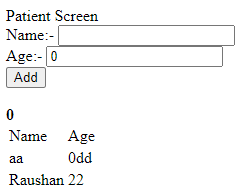
Button Click And Grid: We have button and patient object, we want to add in internal collection and it should be display in table
Its Input has mentioned in previous block click here
Output:
Must refer this videos for more details:
Thank You...!
SQL Indexes Clustered and Non Clustered
Hey Guys, I hope that you are enjoying with my blogs writing and today's we will cover some "SQL SERVER" Concepts.

Microsoft SQL Server is a relational database management system, or RDBMS, developed and marketed by Microsoft.
As a database server, it is a software products with primary function of storing and retrieving data as requested by other software application.
Initial Releases is April 24, 1989;
Indexes
- Indexes Improves the performance of search or An index is one of the important paths to make the performance of SQL server database high.
- An index is a pointer to data in a table.
- It helps to speed up select queries and Where clause but it slow down data input with the Insert, Update and Delete.
- They are stored in a B- tree structure (Balance search tree) that helps SQL Server users quickly and efficiently find the rows or associated with key values.
- Defragmentation in SQL, It changes the physical ordering of data (as it loses contiguous allocation) and the retrieval becomes time consuming, resulting in slow database performance.
Types of SQL Server Indexes
- There are two types of Indexes in SQL server.
SQL Backing up, Restore and script based
Hey Guys, I hope that you are enjoying with my blogs writing and today's we will cover some "SQL SERVER" Concepts.
Microsoft SQL Server is a relational database management system, or RDBMS, developed and marketed by Microsoft.
As a database server, it is a software products with primary function of storing and retrieving data as requested by other software application.
Initial Releases is April 24, 1989;
- Backup: A copy of SQL server data that can be used to restore recover the data after failure.
- A backup of SQL server that is created at the level of database or one or more of its file or filegroup.
- Full Backup: The most basic and complete type of backup is a full backup. This type of backup makes a copy of all data to a storage device, such as disk or tape
- Incremental Backup: It is a type of backup that only copies data that has been changed or created since the previous backup activity was conducted.
- Differential Backup: A data backup that is based on the latest full backup of a complete or partial database.
- Incremental backup, sometimes called Differential backup while Differential backup are sometimes called "Cumulative backup".

- Transaction Log: It is an integral part of SQL. Every database has a transaction file that is stored within the log file that is separated from data file It records all database modification.
- Connect to the server and expand database -> Right click on database

- A new windows will be open then select which type of backup you want , so I have selected full backup .

- Select backup destination with .bak extension

- And finally its backup has completed.

- And this is my back file in D drive

Data type in C# .NET
20th Day
Hey Guys, I hope that you are Enjoying with my blogs and in previous blog we have learned about Basic concepts of C#, Class Libraries and Reusability and Today's we will see Data type of C# .

- .NET is a free, cross-platform, open source developer platform for building many different types of applications.
- .NET Core is a cross-platform .NET implementation for websites, servers, and console apps on Windows, Linux, and macOS.
Data Type
Data type specifies the size and type of variable values .It is important to use the correct datatypes of corresponding variable. C# is strongly typed language.
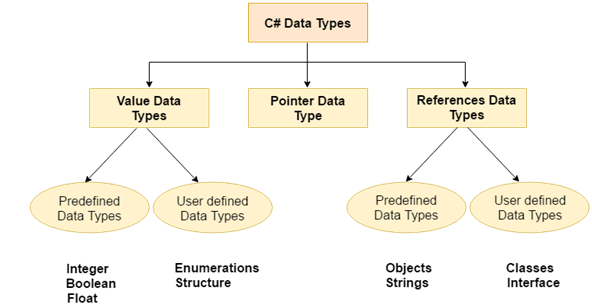
- Numeric data types in C# must used for numbers are int( whole number) and double(floating point numbers)..int i = 10; // Now focus on integer and double.decimal y = 10.45;double z = 10.23;float t = 10;string x = "shiv123";bool b = true;
- To find the the Min and Max values of int, double float etc.

- To find Min and Max values of Int16(short) , Int32(int), Int64(long) etc.
- Input:static void Main(string[] args){// numericalConsole.WriteLine("Min & Max value of short(Int16) ");Console.Write(short.MinValue );Console.Write(" to ");Console.WriteLine(short.MaxValue );Console.Write("\n");Console.WriteLine("Min & Max value of int(Int32) ");Console.Write(int.MinValue);Console.Write(" to ");Console.WriteLine(int.MaxValue);Console.Write("\n");Console.WriteLine("Min & Max value of long(Int64) ");Console.Write(long.MinValue);Console.Write(" to ");Console.WriteLine(long.MaxValue);Console.Write("\n");Console.WriteLine("Min & Max value of double");Console.Write(double.MinValue );Console.Write(" to ");Console.WriteLine(double.MaxValue );Console.Read();}
- int16 : It is called short which values lies between -32768 to 32767 or 2 raise 16/2.Which can used it for age ,weight or small use it gives two types like Signed value it can hold +ve values as well as -ve. while in unsigned only +ve value can holds.
- And signed and unsigned values for all data types like double, float etc.
- int32 : It is simply called int which values lies between -2147483648 to 2147483647. Which can used greater value than int16.
- int64 :It is called long which values lies between -9223372036854775808 to 9223372036854775807. Which can used for long values.
Output:

Must Watch this video for more details learn..
Thank You...!
Class Libraries and Reusability in C#
19th Day
Hey Guys, I hope that you are Enjoying with my blogs in previous block we studied basic of C#, Its Installation, IL code by just in time make it machine code and Today's we will study about Basic concepts of C#, Class Libraries and Reusability.
- .NET is a free, cross-platform, open source developer platform for building many different types of applications.
- .NET Core is a cross-platform .NET implementation for websites, servers, and console apps on Windows, Linux, and macOS.
- With .NET, you can use multiple languages, editors, and libraries to build for web, mobile, desktop, games, and IoT.
- So lets create one console app(.NET core) project for better understanding to this concept.
- It is an exe i.e executable. we can double click and execute this folder.
- Build now and right click on console app open as an explorer go to bin folder and will get exe folder.
- Input:(Program.cs)
using System;using ClassLibrary1;namespace ConsoleApp2{class Program{static void Main(string[] args){Class1 x = new Class1();// we can call here to class1Console.WriteLine(x.Add(10,20));// here we giving parameter to add functionConsole.WriteLine("Hello World!");Console.Read();}}}
- To make DLL, Will have to create a Class library.
- DLL stands for dynamic link library it is library that contains function and codes that can used by more than one program at a time. Once we have created DLL we can use in many application.
- Input:(Class1.cs)using System;namespace ClassLibrary1{public class Class1{public int Add(int num1, int num2){return num1 + num2;}}}
- This code we can execute but can't link it.
- After build it, If we want to see DLL file go to its bin folder then executable file not will show , it show dll(dynamic link library) like given below

- We can't run this folder by double click because its not an executable it is Dynamic link library.so we can call to its function from another class.
- For reference to console app ,go to right side-> right click on dependency -> add project reference-> class library.
- Assembly has two types of library 1. Exe 2. DLL.
- Output:

Must refer this videos for more details:
Basic concepts of C# ,IL code and JIT
18th Day
Hey Guys, I hope that you are Enjoying with my blogs and Today's we will study about .NET Platform with "C#" Language basic concept.
- .NET is a free, cross-platform, open source developer platform for building many different types of applications.
- .NET Core is a cross-platform .NET implementation for websites, servers, and console apps on Windows, Linux, and macOS.
- With .NET, you can use multiple languages, editors, and libraries to build for web, mobile, desktop, games, and IoT.
- whatever code write in C# ,It compiles in intermediate language code and by just in time compiler(JIT) make IL code to machine code. For Example

- suppose if want to see IL code then build this program.
- If we build this code then its IL code will show in bin folder
- Go to solution explorer -> right click->open folder in file Explorer->binary folder(bin)->debug->

- Many code folders has like dynamic link library(dll) Console application only for start to dll not run directly that's why application console first link and then run dll.
- when we double click on exe then JIT start in background.
- And JIT compile to single-single line make it machine code
- Intermediate language disassembler (ILDSM) for showing purpose we will to go on visual command prompt
- Like visual studio developer command prompt go and open then new dialogue box will open drag and drop click on console application
- Expand -> static void main then IL code will be show
- so we can say that C# doesn't compile directly into machine code its first compile into intermediate language then this IL code later compile by JIT into Binary code.
- For Example: Flow of C# code
- C# is a strongly typed language it means that language is one in which variables are bound to specific data types, and will result in type errors like. It will show error can not implicitly convert type string to int.int i = 0;i++;i="Raushan"

- A strongly-typed language in which variables are bound to specific data types, and will result in type errors if types do not match up as expected in the expression — regardless of when type checking occurs.
- C# Data Types: It is strongly data type language.
- if condition : It is used where condition is true. otherwise else condition.


Output: After insert data

Without insert data
- Convert one data type to another:

Output:

Must refer this videos for more details:
Thank You...!
الاشتراك في:
الرسائل (Atom)