VS CODE, NODE JS AND NPM

 7th Day                                                                           

 Hey Guys, I hope that you have also installed Vs Code in your system. If you have not installed yet then please install it through 6.1 lecture. (Click this link  to go 6.1 lecture)Because from today we will work with Vs Code. 


                       So let's start with Vs Code.

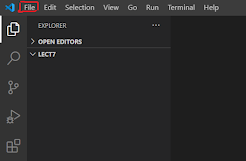
        1.Click on file and select Open File/Open Folder and open it.
                                                                2.After open the folder/file make a html file name like index.html.
                         Right click on Vs-explorer and click on New file and give name.html
  •  After creating html file .It will look like.....


      • Type "doc+ Tab " in Vs Code it gives ready made code like..                                                                                                                                                                                                                             

                            
            So Friends we have learned each and everything which has mentioned above.
            Now we are going to do JavaScript Code and this code we can not use 
            outside the JS browser . For Example:
                                      Input:

                                      Output:

           Suppose, 
                 If this Same concept wants to execute on Command Prompt then it 
                 will be require JS Compiler which is called Node JS
                 Node JS is a JavaScript Runtime built on Chrome's V8 JavaScript 
                 engine. So Let's Install Node JS....

                                                      NODE JS
          • It is a one type of JS Compiler.
                                        Importance of Node JS
        •  We can use it on multiple operating system. 
        • To make effective to JS, Node play vital role. 
        • Using Node JS we can execute it out of our browser.                                          
                               1. Click here, Download Node JS.
                                   2. Select Version as your choice.
                                   3. And then install it.
                                   4. Check Node JS installed or not using cmd like:                                                           
                                       Just type: node -v , v12.18.3 has been installed.
                            So friends ,Now with the help of this Node JS ,We can run 
                            outside our browser. For Example: 
      • Now Create file name.js and write code like: 
      • And run through command prompt.
      • Input:
                   

    •  Output: Command is:  node hello.js
                                                                                                                                                                                                                      
      • NODE PACKAGE MANAGER:  A package in Node.js contains all the files you need for a module. The NPM program is installed on your computer when you install Node.js .
      • Using this command on cmd we can install: npm install jquery.
    • After that it will install successfully NPM.
                                                                    Thank you...


CREATING A SIMPLE UI IN HTML 6.2

           6th Day 

        Friends we have already know that about IIFE concept so using this concept
         we will make SIMPLE UI IN HTML
                    We are using here IIFE Concept
                   
Using this concept we are making objects in UI.  
                   
This is the whole process of creating a simple UI                 
  <html lang="en">
<head>
    <meta charset="UTF-8">
    <meta name="viewport" content="width=device-width, initial-scale=1.0">
    <title>Document</title>
</head>
<body>
    <script>
        // We are using here IIFE Concepts.
       var customerNameSpace= (function(){
          function _Customer (){
              _name="";
              _address="";
              _add = function(){
                  alert(_name +""+_address);
              }
              return{
            
             add:_add
              }
              
          }
          return{
                  Customer:_Customer
              }
        })();
        // Here we are making objects
        function CreateCustomer(){
        var Customer=new customerNameSpace.Customer();
        Customer.name ="Raushan";
        Customer.add();
        Customer.add();
        alert(this.name);

        }
        
    </script>
   Customer Name <input type="text" name="" id="txtName"><br> 
   Customer address <textarea name="" id="" cols="30" rows="10"></textarea><br>
   <input type="button" value="Add Customer"onclick="CreateCustomer()"><br>
</body>
</html>

Output: 

To know in more detail to this concept. click here


Thank You....


VISUAL STUDIO CODE INSTALLATION 6.1

  6th Day                                                                            


  • Hey Guys Welcome to my 6th day of Blog writing, I'm last year student from Shiva ji University, Kolhapur. This post has been posted for beginners and professionals both and new post will have to be updated on Every Saturday & Sunday.


       Steps to install the VS Code on Windows 10

        1. Download the Setup File

                 https://code.visualstudio.com/

 2. Run the VS code Setup Wizard  

  •    Close All Other Applications before the VS code installation starts     

   Accept the License Agreement 

  Select the Installation Location 


Placing the Shortcuts


 Selecting Additional Tasks


    •                                     Install VS code on Windows 10                                                                                                                                                                                     
    •                                              Finish and Launch                                                                                                                                                                                                                                                                                                                                 


                                   Thank You...


CLOSURES 5

      5th Day                                                                                        See the source image

  • Hey Guys Welcome to my 5th day of Blog writing, I'm last year student from Shiva ji University, Kolhapur. This post has been posted for beginners and professionals both and new post will have to be updated on Every Saturday & Sunday.

  • HEY GUYS,WHAT DO YOU UNDERSTAND ABOUT  CLOSURES IN JS?
  • It means a closure can access variables and arguments of its outer function even after the function has finished.
  • Closure means, A function exist inside the another function. 
  • For Example , Syntax: var V= (function ( ) {      } ) ( ); This is the function.
  • Here we taking function inside another function like 
              
                  var math=   (function ( ) 
                    {       
         function Add ( ) {} //  function inside another function

                  function Substract ( ) {} // function inside another function

                  function Multiplication ( ) {} //  function inside another function

           } ) ( );
                            This concept is known as Closures. For Example


       Explanation:
       So friends in above example, we have taken a function inside another function:
       var Math=(function ( ) { }) ( ); 
       Its inside we have taken another function which will be private like: 
       function _Add(num1,num2) { return num1+num2}
       Here Public function is : return {  Add: _Add  }
       var output= Math.Add(1,2) ,It is Developer client which is invoke my method.
        Output:
          

                                                           Thank You...


Shadowing and IIFE 4

 4th Day                                                                                             See the source image


  • Hey Guys Welcome to my 4th day of Blog writing, I'm last year student from Shiva ji University, Kolhapur. This post has been posted for beginners and professionals both and new post will have to be updated on Every Saturday & Sunday.

          Q. Guys, What is Shadowing and how to prevent it ?

         A. Shadowing is one type of features of  JavaScript. Let's see example:

                 Input: 

            Explanation:                                                                                                                                 Above mentioned simple Example, We create a function fun()1

          and invoked fun1(); it given as output "This is fun1".

                        Output:

For Function:

        Note:

        Suppose that by mistake we created same function more than one

       times in that case 2nd function will become overlap on 1st function 

       this concept is known as Shadowing.

                          Example  Input:

            Explanation:                                                                                                                          Above two same function has been created and invoked then after 
   2nd time created function overlap on 1st so 2nd will be show and 
   1st will become hide.

                             Output: 


                                                      For Variable:
    In case of variable, more than one variable has been declared but in that 
    case both will  show output but different 1st variable will show 1 while 2nd                            will 0.
                                  Input:
                                    

                               Output:                For 1st Variable
                             
                              For 2nd Variable                    
                     
     Immediately Invoked Function Expression(IIFE)
  •      It is Prevent to the shadowing in program. Its is defined as 
  •     (function() { Statements })(); For Example:

                    Input: 


          Output: 


Thank you...

Literal and Constructor way of Creating Objects 3.2

 3rd Day                                                                                           See the source image

        QHey Guys, What is the Literal and Constructor way of Creating Objects and use?

       A.1. Objects created using object literals are singletons. This means when a change is                            made to the object, it affects that object across the entire script. For Example

               Input:


                              var person ={}; // This is called literal way of creating objects. this is also comes                                      under prototypical language.

                           Output:           


                  2Constructor way of Creating Objects:

                In this case, we make a function and its attributes and also make function's object,

                   which is called Constructor way of Creating Objects. For Example

                    Input:

                       Explanation: In above Example firstly we made an object name person and its 
                        attributes like Var person = {}; is called literal way of creating objects.

                        After that , We made a ,function Human() and its attributes and also make an object                                                        (Var obj = new Human()) is called Constructor way of an objects.

                    Output:

              Prototypical: Input


Explanation:     In above Example, We made a function name Human and mention its attributes,                                      2nd things var men = new Human(); made on Human prototype , 
             Output: 
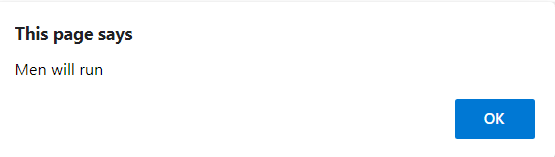
  • As well as men.run(); will give Men will run.
  • men.behave(); will give All human should have good behavior.


                                                           Thank You....