Abstract Classes , Need of Interfaces and its Differences

    12th Day                                                                                                

    Hey Guys ,I hope that you are enjoying with my blogs writing and today's we                            will cover some concepts like:


         ABSTACT CLASSES :
  • A TypeScript Abstract class is a class which may have some unimplemented methods. These methods are called abstract methods. We can't create an instance of an abstract class. But other classes can derived from abstract class and reuse the functionality of base class.
  • SYNTAX:
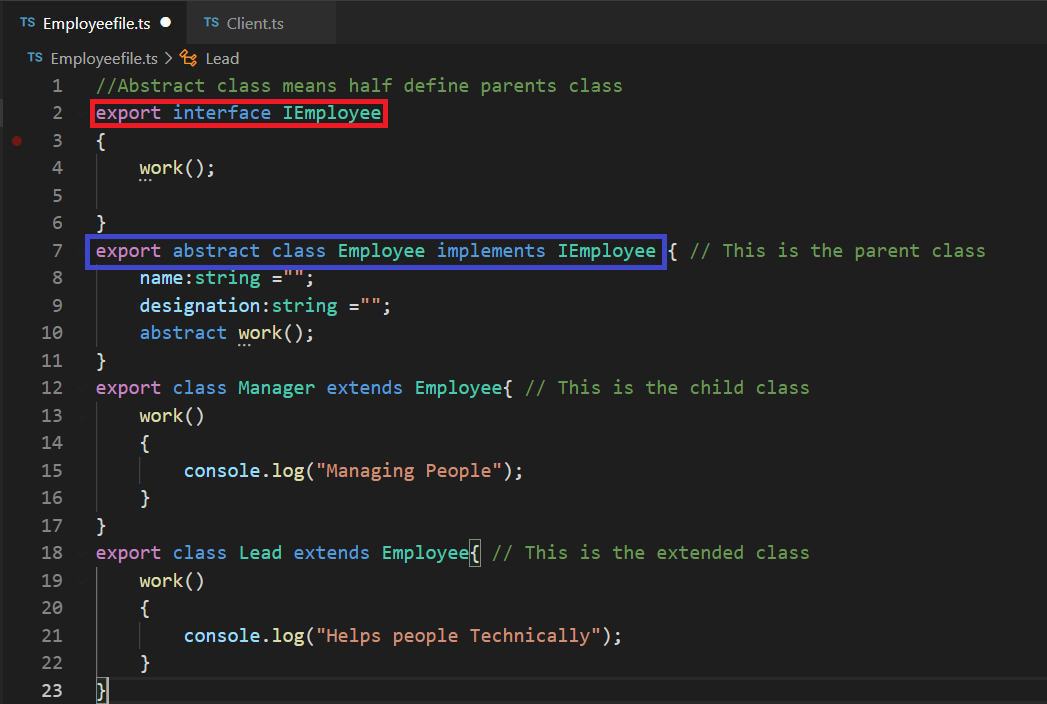
        export abstract class Employee
{ // This is the half defined parent class
     name:string ="";
     designation:string ="";
     abstract Dowork();
}

Explanation: In above ,We have created an abstract class Employee. And first
method Dowork is an abstract and we have used abstract keyword before the method .
  •  Semantically, Abstract class means half define parents class and we can also say that Employee class is a  generalization class but not in all conditions. 
  • Remember that, Parent class and generalization class has some difference, it has not each and every condition same. 
  •  In some parent classes has all method  implemented and  it has not any half define class in that case it is not a generalization class.

Derived Class: It is also called specialization class  or concrete class because 
        any method which is abstract class should be implemented by the concrete class.

export class Manager extends Employee
// This is the child class
     Dowork()
     {
         console.log("Managing People");
     }
}
export class Lead extends Employee
// This is the extended class
     Dowork()
     {
         console.log("Helps people Technically");
     }
}
Explanation: In above example, We have created Manager and Lead
concrete classes or specialization classes. And each and every classes
has its own work. Suppose by mistake we have not defined concrete classes work,
then it will show error.
  • Concrete/specialization class means child class.
      INTERFACE:
  • Interface has such type of properties which can not provide any type of implementation but we can define its properties and function only.
  • Impact Analysis means whenever we change only one places then you will have to change many places.
  • SYNTAX:    
           export interface IEmployee
{
     work();

}
In above example, we have defined an interface IEmployeeWe have implemented IEmployee interface in Employee class by using 'implements' keyword after class name.If we try to differ the data types of properties or signature of method from IEmployee interface in Employee class, then TypeScript compiler will throw an error.

      NEED OF INTERFACES AND ITS DIFFERENCES                                 

INTERFACE

ABSTRACT

1.      In Interface, all members are abstract.

·        But in this case its some members are abstract and some are fully implemented.

2.      Interface supports multiple inheritances.

·        But abstract class does not support multiple inheritances.

3.      Interface is a CONTRACT, LEGAL<, ENFORCEMENT -> impact analysis.

·        Abstract class is a half define parent class

4.      TypeScript Interface has zero JavaScript code.

·        But abstract class compile to JavaScript function.


      Hey Guys if you want more details to this concept (Click here)


  • So friend If you have any mistakes in any articles you can send me on my email:1809raushan@gmail.com.

                                                                                Thank You...


INHERITANCE AND CONSTUCTOR CONCEPTS

10th Day                                                                                                                          
                                                                                                                   
 Hey Guys ,I hope that you are enjoying with my blogs writing and today's we 
 will cover some concepts:


          INHERITANCE :   
    • Inheritance is an aspect of OOPs languages.
    • which provides the ability of a program to create a new class from an existing class.
    • The class whose members are inherited is called the base class, and the class that inherits those members is called the derived/child/subclass. In child class, we can override or modify the behaviors of its parent class.
    • Syntax:
                    Parent class :
                          
                          class <Class_name>
                                {
                                   // methods and fields
                                 }
    •  Example:
                      

                            Child class:
                          class sub_class_name extends super_class_name  
                           {  
                              // methods and fields  
                           {
    •  Example:


    • We can use it for Code Reusability.
    • We can use it for Method Overriding.
    • This is called IS RELATIONSHIP i.e. Customer IS A CHILD OF  Lead.


    • Using import and export method we have created parent-child relationship.
    •  Example:


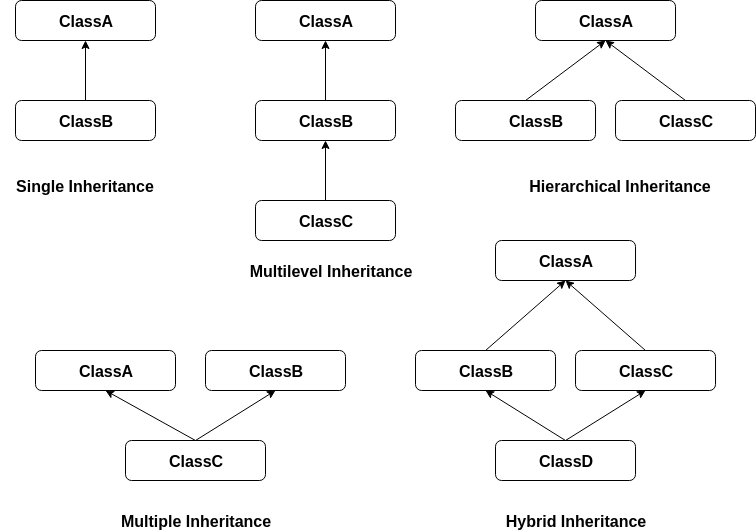
         TYPES OF INHERITANCE:  
    • Single Inheritance: it can inherit properties and behavior from at most one parent class.
    • Multilevel Inheritance: In this case a derived class is derived from another derived class.
    • Multiple Inheritance :When an object or class inherits the characteristics and features form more than one parent class.
    • Hierarchical Inheritance:  In this case, More than one subclass is inherited from a single base class.
    • Hybrid Inheritance: In this case, A class inherits the characteristics and features from more than one form of inheritance.


                 TypeScript Inheritance


           CONSTRUCTOR:    
    • A Constructor is a special type of function of typescript class and it will be automatically invoked when the first object of class is created.
    • TypeScript only allows one constructor implementation.
    • Suppose, In above Example we have required default values like address or anything.
    • For Example: We have created two  class Lead & Customer  in Customer.ts .
    • Customer.ts: 


    • Now here ,we have created  Client.ts which will invoke Customer and Lead class :


    • After Compilation: Using tsc -- init


    • So here tsconfig.json file has been created successfully like Example:


    •  Just Run Client.js file through teminal: node Client.js  address will give as output.


    • Suppose if it has constructor in parent class then first fire it.
             Access Modifiers public private and protected :             :
    • Public: It is accessible outside or anywhere the class.
    • Private: it is only accessible inside the class.
    • Protected: It is only accessible in inherited classes and own classes we can't access outside.


  • So friend If you have any mistakes in any articles you can send me on my email:1809raushan@gmail.com.

                                                                                Thank You...


TSCONFIG FILE

       9th Day                                                                             

Hey Guys, I hope that you are also enjoying with my blogs and today's we will study about :  


              VARIABLE DECLARATION:
    • Syntax:  Var [identifier]:[type-annotation]=value;
    • For Example: we can write like
    • var name:string = ”Raushan”
    • var name:string; //The variable is a string variable
    • var name = ”Raushan” //The variable’s type is inferred from the data type.
    • var name;   // Its value is set to undefined by default

               CREATING CLASS:
    • Class is  blueprint for creating objects as well as custom data type.
    • Syntax : Class Class_Name { // Class Scope }
    • For Example: Class Customer{
                                                 // Customer is a Class Name
                                                                     }                                                                                                                       

                CREATING OBJECT

    • To create an instance of the class, use the new keyword.
    • Syntax ::Var object_name = new class_name([argument])
    • For Example:                                                                                                                                             
    • With the help of Cust1.name="Raushan"; we use this instance.
                   EXPORT AND IMPORT                                                                                   
                  We have created a file of TypeScript in Vs Code : Customerfile.ts
                       Input:
                    
    • Explanation: Above in given code, we have created class, name Customer.
    • And also created its object like Cust1 & Cust2 .
    • We have also used with the help of Cust1.name="Raushan";
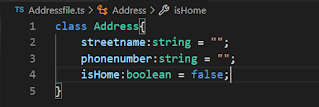
    • Similarly ,Address of this Customer filename has created like:   
             For Importing and Exporting Purpose:
    • We are importing Customerfile: 
    • import { className of Addressfile } from "./Filename of Addressfile"                   
    •  For Example: import{ Address} from "./Addressfile"  like as:

    • For Exporting to Addressfile: export Class Address  like as:
      IMPORTANT POINTS:
    • In Single Address file, We can have multiple address classes.
    • We have two files which has above mentioned so we will compile it with the help of terminals.
    • First we will compile Addressfile and then Customerfile like as:                     
             
    • But Suppose in project has more files then instead of use tsc in each file we can make TS CONFIG FILE. Through command: tsc --init     
    • For Example:    
                      tscconfig.jsonfile created successfully.
    • JSON: it means JavaScript object Notation. It is a format which data represeted using curly braces. For Example: for single Purpose 
    • { "name":"Raushan","Address":"Kolhapur"}
    • For more data we can use :[ { "name":"Raushan","Address":"Kolhapur"},           { "name":"Manjhi","Address":"Kolhapur"}]


                          For more Details you can go through this link click here
                           
    • So friend If you have any mistakes in any articles you can send me on my email:1809raushan@gmail.com.

                                                                                Thank You...


TYPESCRIPT

8th Day                                                                                                      


Hey Guys, I'm very glad to share with you, We have already studied about VS CODE, 
NODE JS, NPM . And today's we are going to study about TYPESCRIPT. 
This concept is very important to start the Angular.


                         TYPESCRIPT      
      • Whole Angular has made in typescript.
      • TypeScript is an open-source language which builds on JavaScript, one of the world’s most used tools. i.e. Any browser, any OS, anywhere JavaScript runs. Entirely Open Source.
      • TypeScript extends JavaScript by adding types.                                                                           

                Basic comparison between JavaScript and TypeScript

    • TypeScript is known as Object oriented programming language whereas JavaScript is a scripting language.
    • TypeScript has a feature known as Static typing but JavaScript does not have this feature. 
    •    In case of TypeScript,
      Var x =0; // TS compiler will treat as number. But when we assign like x="Raushan"  it will show error like:
    •                        
    Important Points:     

        • TypeScript extends JavaScript and makes it strongly typed.
        • Strongly typed means while we write the code the data typed checked.
        • Advantages during development phase errors and issues will be caught.
        • This is the TypeScript Code:
                            
      • But to execute this code we will have to be convert it into JS with VS Code terminal like
      • Command : tsc file.ts .      It will look like:                                                                                                        

        • TypeScript translates/ transpiles /convert to JavaScript.
        • All JavaScript Code are valid for TypeScript code. For Example: alert("Hello"); .         
        • TypeScript is known as Object oriented programming language.
        • TypeScript gives you benefit OOP, Classes,==> Closures and IIFE.
        •  For Example:                                                                                                                   
          In JS code it will convert like: Closure

        •   Using Inheritance Concepts: 
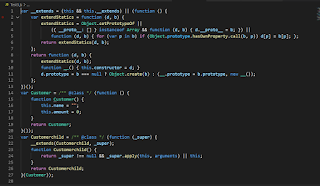
          Its JS  Code will be:

          So friend If you have any mistakes in any articles you can send me on my email:1809raushan@gmail.com.

                                                                                    Thank You...


    VS CODE, NODE JS AND NPM

     7th Day                                                                           

     Hey Guys, I hope that you have also installed Vs Code in your system. If you have not installed yet then please install it through 6.1 lecture. (Click this link  to go 6.1 lecture)Because from today we will work with Vs Code. 


                           So let's start with Vs Code.

            1.Click on file and select Open File/Open Folder and open it.

                                                                    2.After open the folder/file make a html file name like index.html.
                             Right click on Vs-explorer and click on New file and give name.html
    •  After creating html file .It will look like.....


        • Type "doc+ Tab " in Vs Code it gives ready made code like..                                                                                                                                                                                                                             

                                
                So Friends we have learned each and everything which has mentioned above.
                Now we are going to do JavaScript Code and this code we can not use 
                outside the JS browser . For Example:
                                          Input:

                                          Output:

               Suppose, 
                     If this Same concept wants to execute on Command Prompt then it 
                     will be require JS Compiler which is called Node JS
                     Node JS is a JavaScript Runtime built on Chrome's V8 JavaScript 
                     engine. So Let's Install Node JS....

                                                          NODE JS
            • It is a one type of JS Compiler.
                                            Importance of Node JS
          •  We can use it on multiple operating system. 
          • To make effective to JS, Node play vital role. 
          • Using Node JS we can execute it out of our browser.                                          
                                   1. Click here, Download Node JS.
                                       2. Select Version as your choice.
                                       3. And then install it.
                                       4. Check Node JS installed or not using cmd like:                                                           
                                           Just type: node -v , v12.18.3 has been installed.
                                So friends ,Now with the help of this Node JS ,We can run 
                                outside our browser. For Example: 
        • Now Create file name.js and write code like: 
        • And run through command prompt.
        • Input:
                       

      •  Output: Command is:  node hello.js
                                                                                                                                                                                                                        
        • NODE PACKAGE MANAGER:  A package in Node.js contains all the files you need for a module. The NPM program is installed on your computer when you install Node.js .
        • Using this command on cmd we can install: npm install jquery.
      • After that it will install successfully NPM.
                                                                        Thank you...